

Blog
Standard Deviation in Excel: STDEV.S vs STDEV.P

Standard deviation in Excel measures how far values spread around their average, and you calculate it with =STDEV.S(range) for a sample or =STDEV.P(range) for a whole population. It is the number that turns "we sell about 200 a week" into something you can plan with. Two items can both average 200 units a week while one sells 190 to 210 and the other swings between 90 and 330, and they need very different amounts of safety stock. Below you will find which function to use, how to read the result, and a worked demand example you can copy.
What standard deviation tells you
Standard deviation takes each value's distance from the mean, squares it, averages those squares and takes the square root. Because of that final square root, the result is in the same unit as your data: units per week, days of delay, dollars of revenue.
A small standard deviation means values cluster near the average. A large one means they are spread out. That is why you should never report it alone. "Average 200 units, standard deviation 6" describes a steady seller. "Average 200 units, standard deviation 95" describes an item where some weeks you sell less than half the average and other weeks you sell over one and a half times as much.
STDEV.S vs STDEV.P
Excel has several standard deviation functions, but two do almost all the work. The only difference is the denominator.
| Function | Use it when your data is | Divides by | Older name |
|---|---|---|---|
| STDEV.S | A sample of something larger | n − 1 | STDEV |
| STDEV.P | The entire population you care about | n | STDEVP |
According to Microsoft's STDEV.S documentation, STDEV.S assumes its arguments are a sample and uses the "n − 1" method, and if your data is the entire population you should use STDEV.P instead. The STDEV.S page's example uses the breaking strength of ten tools (1345, 1301, 1368, 1322, 1310, 1370, 1318, 1350, 1303, 1299) and returns 27.46; the same data in STDEV.P returns 26.05. STDEV.S is always slightly larger because it divides by a smaller number.
The practical test is what you want the number to say. If you use the last 26 weeks of sales to plan next quarter, those weeks are a sample of ongoing demand, so use STDEV.S. If you only want to describe what happened in a closed quarter and nothing more, STDEV.P fits. Most business analysis uses past data to make a decision about the future, so STDEV.S is the safer default. With hundreds of values the two results are nearly identical; with ten or so, the gap is noticeable.
STDEV and STDEVP are the pre-2010 names. They still calculate the same results but are listed as compatibility functions, so use the new names in new workbooks. STDEVA and STDEVPA are different: they count text in a range as 0 and TRUE as 1, so a column with a few "n/a" entries gives a very different answer.
How to calculate standard deviation in Excel
1. Enter the formula
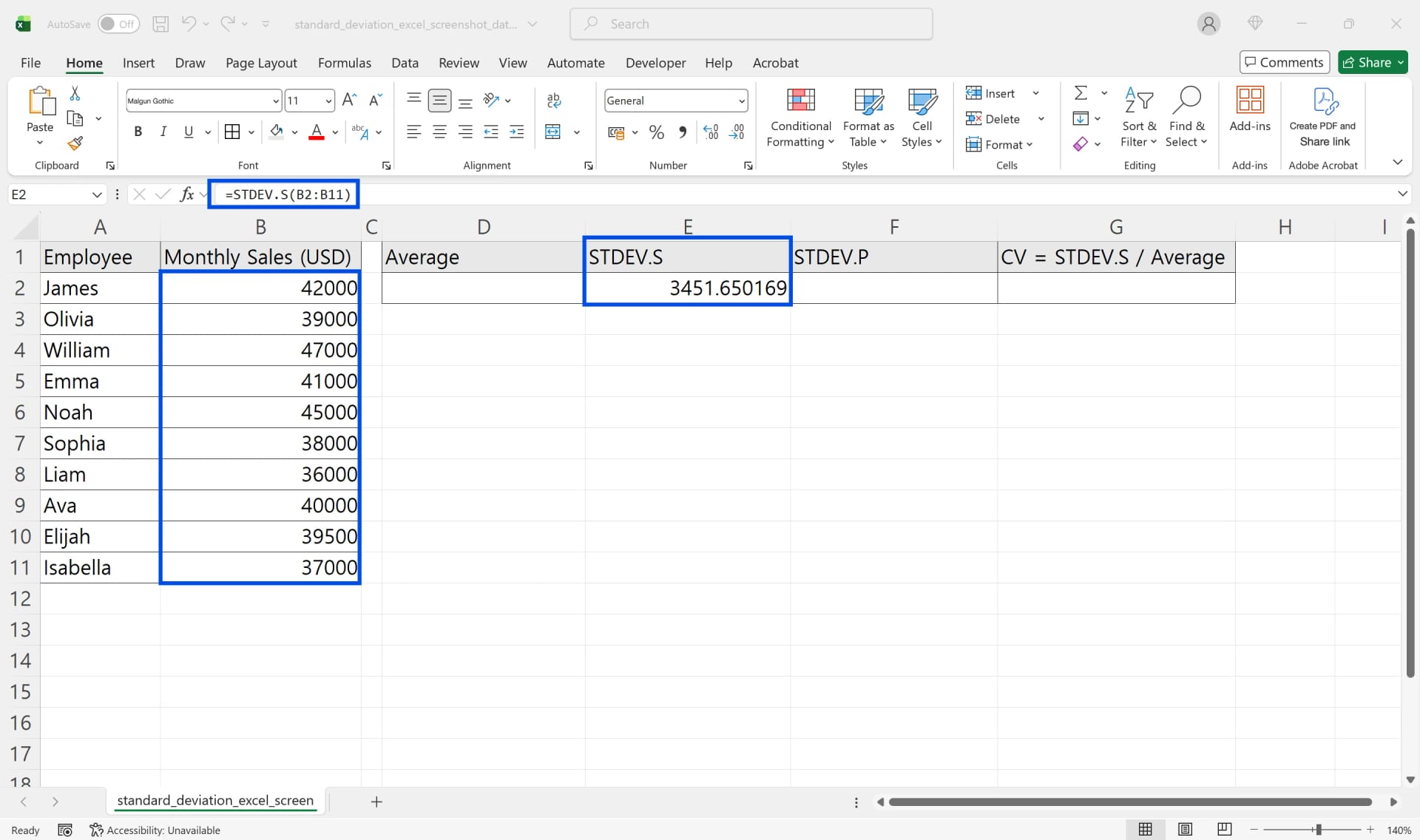
Click the result cell, type =STDEV.S(, select the numbers, close the parenthesis and press Enter. If you can't remember the name, go to Formulas → More Functions → Statistical. The screenshot shows ten monthly sales figures in B2:B11 with a sample standard deviation of 3,451.65.
2. Compare with STDEV.P
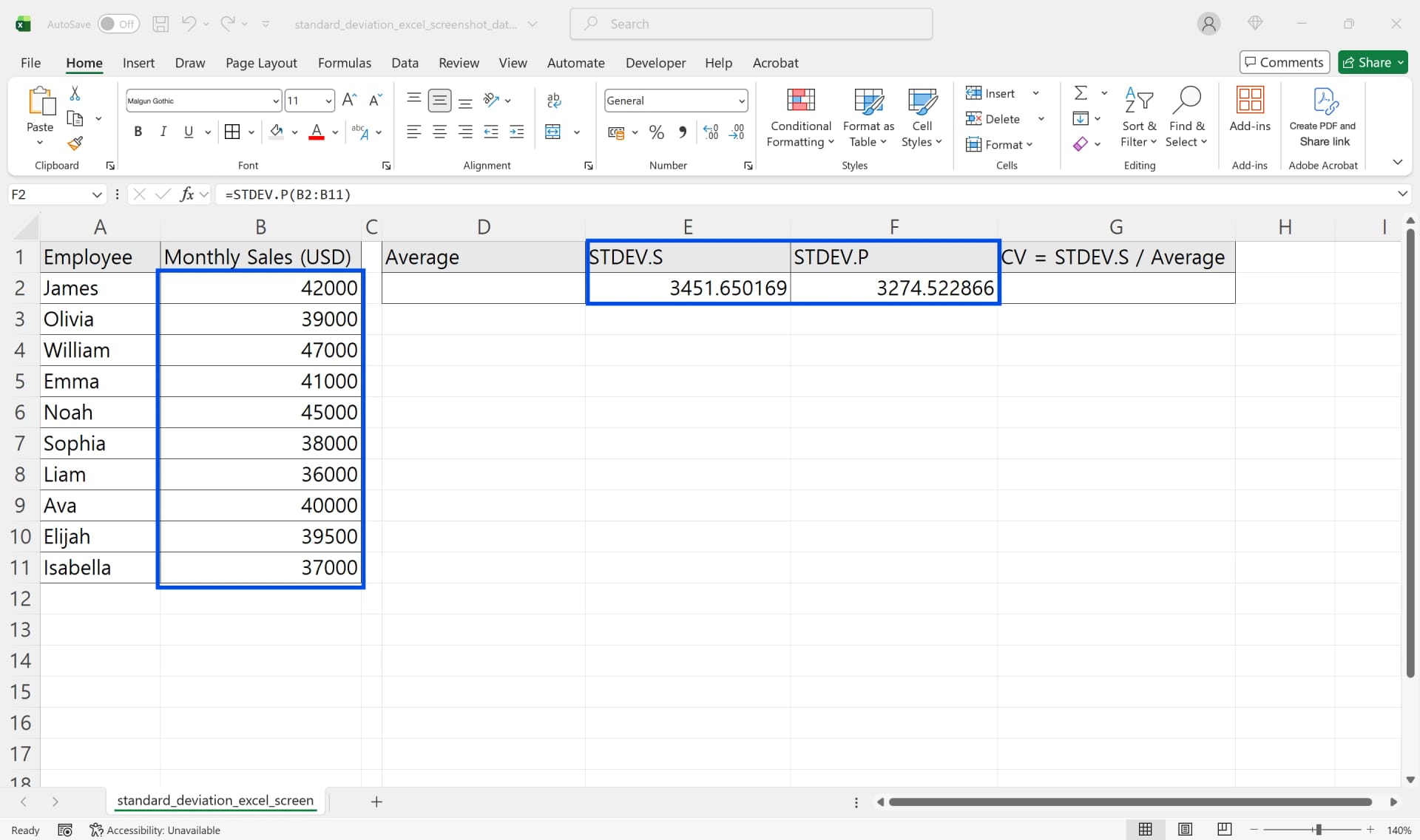
=STDEV.P(B2:B11) on the same range returns 3,274.52. With only ten values the gap is about 177, which is why a team report should state which function it used in the column header.
3. Add the average and the coefficient of variation
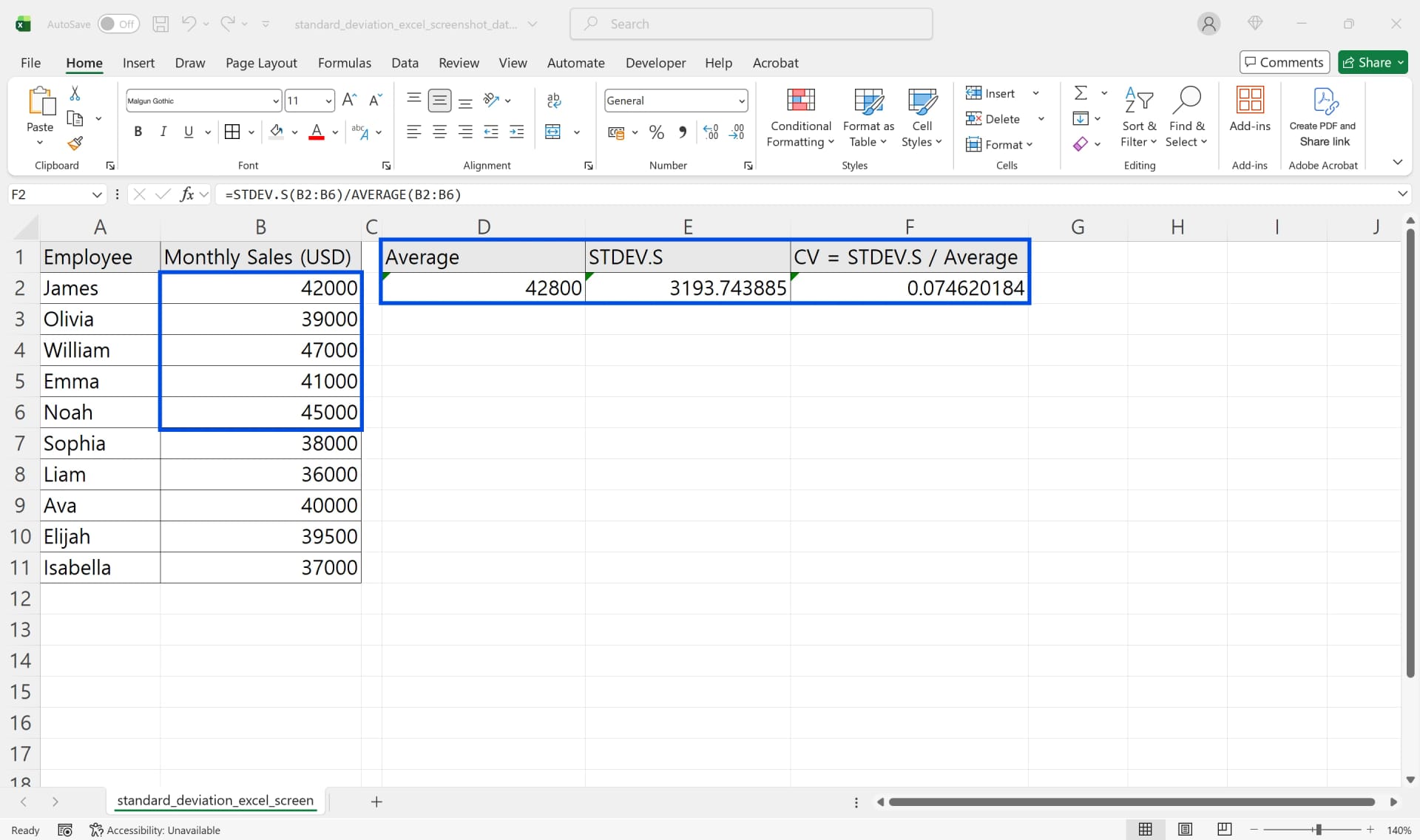
Put =AVERAGE(range) next to every standard deviation. To compare items of different size, divide the standard deviation by the average to get the coefficient of variation: =STDEV.S(range)/AVERAGE(range). A standard deviation of 10 on an item that sells 20 a day is far more erratic than a standard deviation of 100 on an item that sells 2,000 a day; their coefficients are 0.5 and 0.05.
4. Get a full summary with the Analysis ToolPak
If you want mean, standard deviation, minimum, maximum and count in one table, use Data → Data Analysis → Descriptive Statistics. If Data Analysis isn't on the ribbon, turn on the Analysis ToolPak under File → Options → Add-ins → Manage: Excel Add-ins → Go. The standard deviation it reports is the sample version, and the output is static values, so it won't update when the data changes.
Worked example: weekly demand and safety stock
The inventory planner at Ridgeline Manufacturing is reviewing safety stock for replacement parts before the busy season. Her sheet has one row per week and one column per item, eight weeks of shipments.
Two items catch her eye. SKU-1042 shipped 195, 205, 190, 210, 200, 198, 202 and 200 units. SKU-2210 shipped 120, 310, 90, 280, 200, 150, 330 and 120 units. Both total 1,600 units and average exactly 200 a week, so a report built on averages treats them the same.
She adds =STDEV.S(B2:B9) under each column. SKU-1042 comes out at 6.07 units, SKU-2210 at 94.72 units. The coefficients of variation are 0.03 and 0.47. SKU-2210 is about fifteen times as volatile.
Next she turns that into stock. A common textbook starting point for safety stock is z × standard deviation of demand × √(lead time), assuming fairly normal demand and a steady lead time. With a two-week lead time and z = 1.65 (roughly a 95% service level), SKU-1042 needs about 14 units of safety stock and SKU-2210 about 221. Holding the same buffer for both would leave SKU-2210 short in its high weeks and tie up cash in SKU-1042.
If your data is in a long list instead (date, item, quantity), there is no STDEV.IFS function. In Microsoft 365 or Excel 2021 and later, filter inside the formula: =STDEV.S(FILTER(C2:C500, B2:B500="SKU-2210")). In older versions, sort by item and select each block, or use a PivotTable and change Summarize Values By to the standard deviation option.
One more check before trusting the numbers: items introduced partway through the period have blank early weeks. Leave those cells blank, not zero. Blanks are ignored; zeros are counted as weeks with no demand and inflate the standard deviation.

👉 Excel AVERAGE Function: AVERAGEIF and Weighted Averages
Common mistakes and how to fix them
#DIV/0! instead of a number. STDEV.S needs at least two numeric values. You get this error when the range holds one number, or when the "numbers" were imported as text. Select the cells, click the warning icon and choose Convert to Number.
A result that looks too small. In a cell reference, text, logical values and empty cells are ignored. If half your values are text, only the other half are measured. Run =COUNT(range) to see how many numbers were actually used.
Comparing different scales. A standard deviation in dollars can't be compared with one in days, and even within one unit, large and small items need the coefficient of variation.
One outlier driving the answer. Deviations are squared, so a single extreme week has a big effect. Find out why that week happened (a one-off bulk order, a stock-out) before you decide whether to exclude it, and note the decision in the sheet.
Mixed functions across reports. If one analyst uses STDEV.S and another STDEV.P, the same data produces two answers. Pick one per metric.
Version differences
STDEV.S and STDEV.P exist in Excel 2010 and every version since, including Microsoft 365, Excel for the web and Excel for Mac. Excel 2007 and earlier only have STDEV and STDEVP. FILTER, used above for per-item calculations, requires Microsoft 365, Excel 2021 or Excel 2024. The Analysis ToolPak is available in Windows and Mac desktop Excel but not in Excel for the web.
FAQ
Q. Is STDEV the same as STDEV.S?
Yes. Both use the sample method and return the same result. STDEV is kept for compatibility, and STDEV.S is the current name.
Q. What does a standard deviation of 0 mean?
Every counted value is identical. If you didn't expect that, check with =COUNT(range) whether most of the values were skipped as text.
Q. Can I show standard deviation on a chart?
Yes. Select the chart, click Chart Elements (the + button), go to Error Bars → More Options, choose Custom → Specify Value and point to the cell with your STDEV.S result.
Q. Does the status bar show standard deviation?
No. The status bar can show Average, Count, Numerical Count, Minimum, Maximum and Sum. Use a formula or Descriptive Statistics for standard deviation.
How inline AI measures variation for you
inline AI adds the average, standard deviation and coefficient of variation for every item directly in the workbook you have open, and flags the items that swing the most. With ARP, items that fall below safety stock trigger purchase orders to your suppliers, so a buffer based on real variation turns into orders on time.
Hand your documents and your company’s work to inline AI.
Keep a file open, say what you need, and AI edits it or drafts a new one. Add the company AI OS and AI runs the rest of the work, ERP included.
Book a demo