
Blog
How to Sort Data in Excel: Multi-Level Sorts and Fixes with AI

When sorting data in Excel goes wrong, the sort button is rarely the problem. Numbers stored as text sort as 1, 10, 2, 20; dates typed as text sort alphabetically; merged cells block the sort; and a partial selection moves one column while the others stay put. Files that come from outside the company are the worst for this. A pick list exported from a logistics partner's system, or a shipping schedule a customer sends over, usually has all four problems at once, and the person sorting it has a truck leaving in an hour. In the AI Browser, the file stays open in its tab and the AI beside it fixes what would break the sort, then sorts it.
How Excel Sorting Works
Ascending order puts numbers smallest first, text A to Z and dates earliest first; descending reverses it. A multi-level sort orders by one column, then by a second within each group, and so on, set up in Data > Sort with Add Level.
Excel sorts whole rows only when it can see the whole table. Four things break that:
| Problem | Symptom |
|---|---|
| Numbers stored as text | 1, 10, 2, 20 order; green triangles in cells |
| Text dates or mixed separators | Dates out of order |
| Leading or trailing spaces, blank cells | Identical values split into separate groups |
| Merged cells, partial selection | Error message, or rows that no longer line up |
Sorting in the AI Browser
The setup: a pick list from a logistics partner
A distributor ships through a third-party warehouse. Every afternoon the warehouse sends a pick list as an Excel attachment: order number, customer, ship date, zone, bin location, quantity. The shipping coordinator needs it in picking order before the evening run. Today's file has merged group headers for each customer, quantities stored as text, ship dates in two formats, and zone names with trailing spaces.
The coordinator opens the attachment in an AI Browser tab and types:
"Sort this pick list by ship date, earliest first, then by zone, then by bin location. Fix anything that would make the sort wrong first, and tell me what you changed. Don't change any order numbers or quantities."
What the AI does
- Checks the structure. It finds the merged customer header rows, unmerges them, and fills the customer name into each order row so no row loses its customer after sorting.
- Fixes types without changing values. Quantities stored as text become numbers with the same value. Ship dates in two formats become real dates, and it lists any date it couldn't read rather than guessing.
- Cleans comparison text. Trailing spaces in zone names are trimmed so "Zone A" and "Zone A " sort together.
- Sorts the whole table. It selects every column, including the header, and runs the three-level sort.
- Reports. A short summary of what it changed and a list of rows to check, such as a bin location that doesn't follow the warehouse's usual pattern.
What the coordinator checks
The coordinator looks at the top of the sorted list, the unreadable dates and the odd bin locations. If the pick list needs to be checked against today's order sheet, that's one more request: open both in tabs and the AI lists differences, such as a short pick or a line missing from the warehouse's list, without changing either side.
How it stays safe
The AI acts with the coordinator's permissions. Cleaning and sorting the attachment runs right away, and the original attachment stays as it arrived. Sending the sorted list on to the warehouse asks for confirmation first. Every request and change is recorded in the audit log.
When the same file arrives every day
Since the same file arrives every day, the request can stay the same too. Open tomorrow's attachment and ask the AI to "clean and sort it like yesterday's," and it applies the same fixes, including the partner's two date formats, and reports only what is new.
👉 How to Find Duplicates in Excel: Highlight and Review with AI
Doing It by Hand
Sort by one column
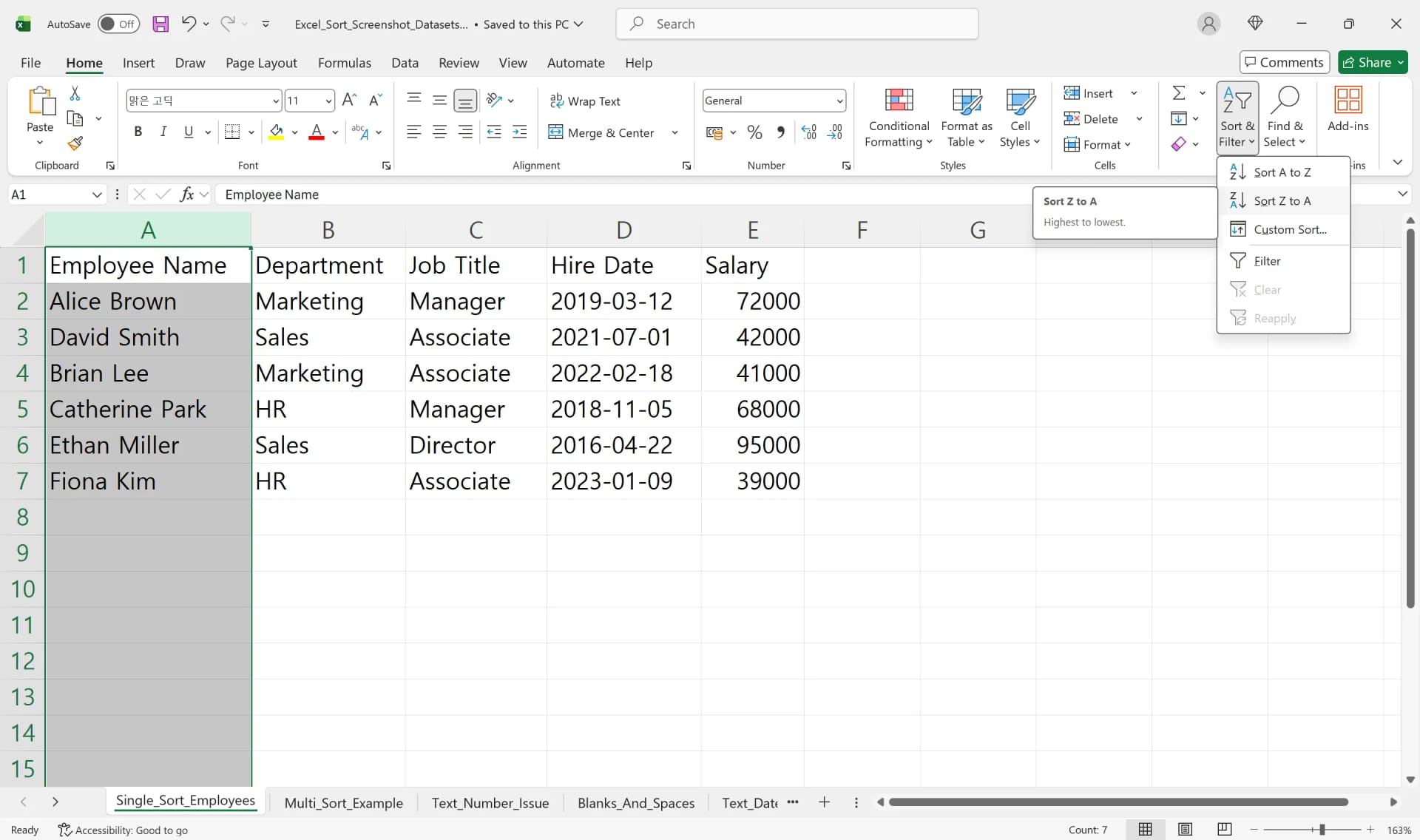
Click any cell in the column, then Home > Sort & Filter > Sort A to Z (or Data > Sort A to Z). Excel extends the selection to adjacent data. Don't select a single column on its own, or only that column moves.
Sort by several columns
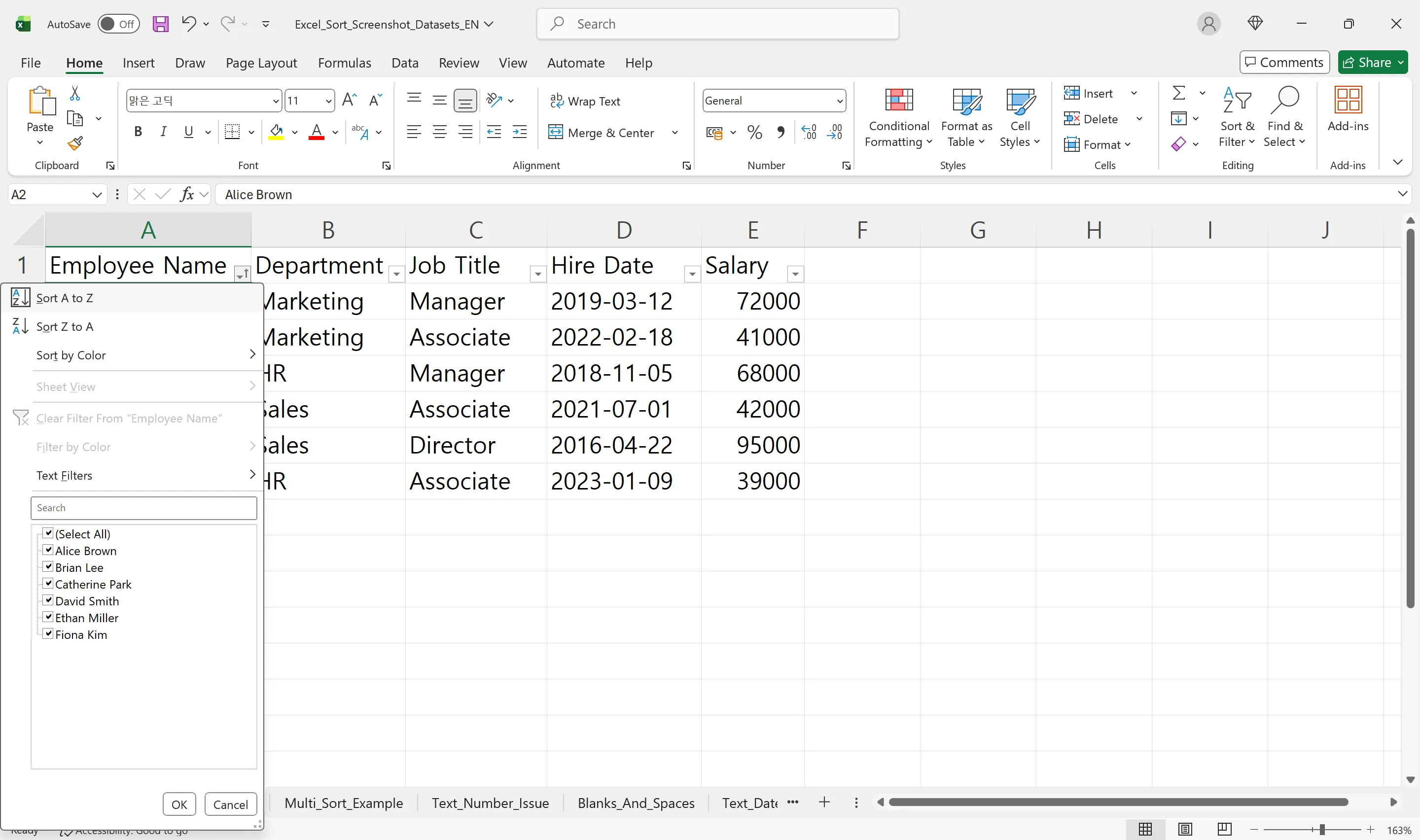
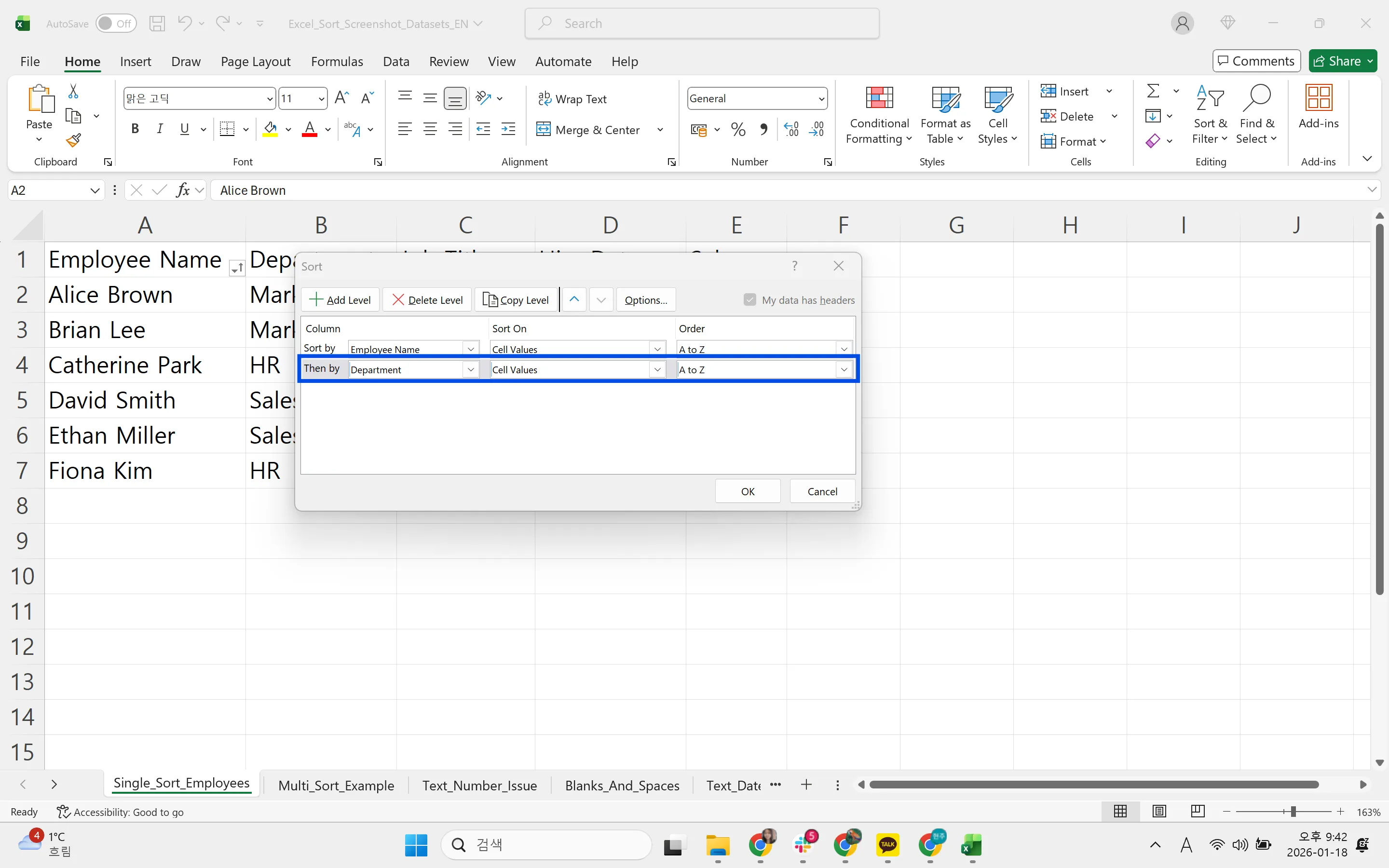
Select the whole range with headers, click Data > Sort, choose the first column and order, and click Add Level for each additional column.
Convert numbers stored as text
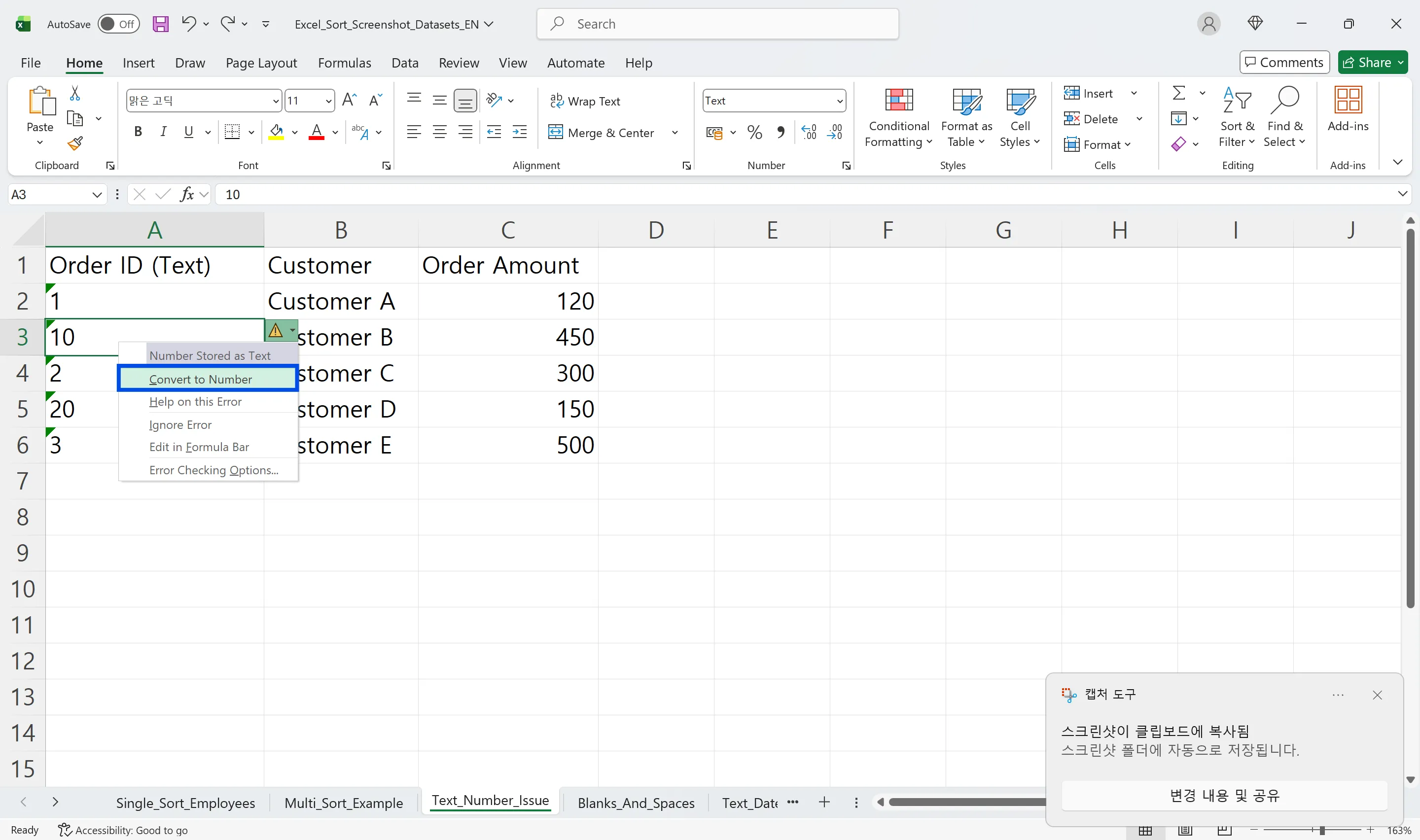
Select the cells, click the warning icon and choose Convert to Number. Or type 1 in an empty cell, copy it, select the range, and use Paste Special > Multiply.
Fix text dates
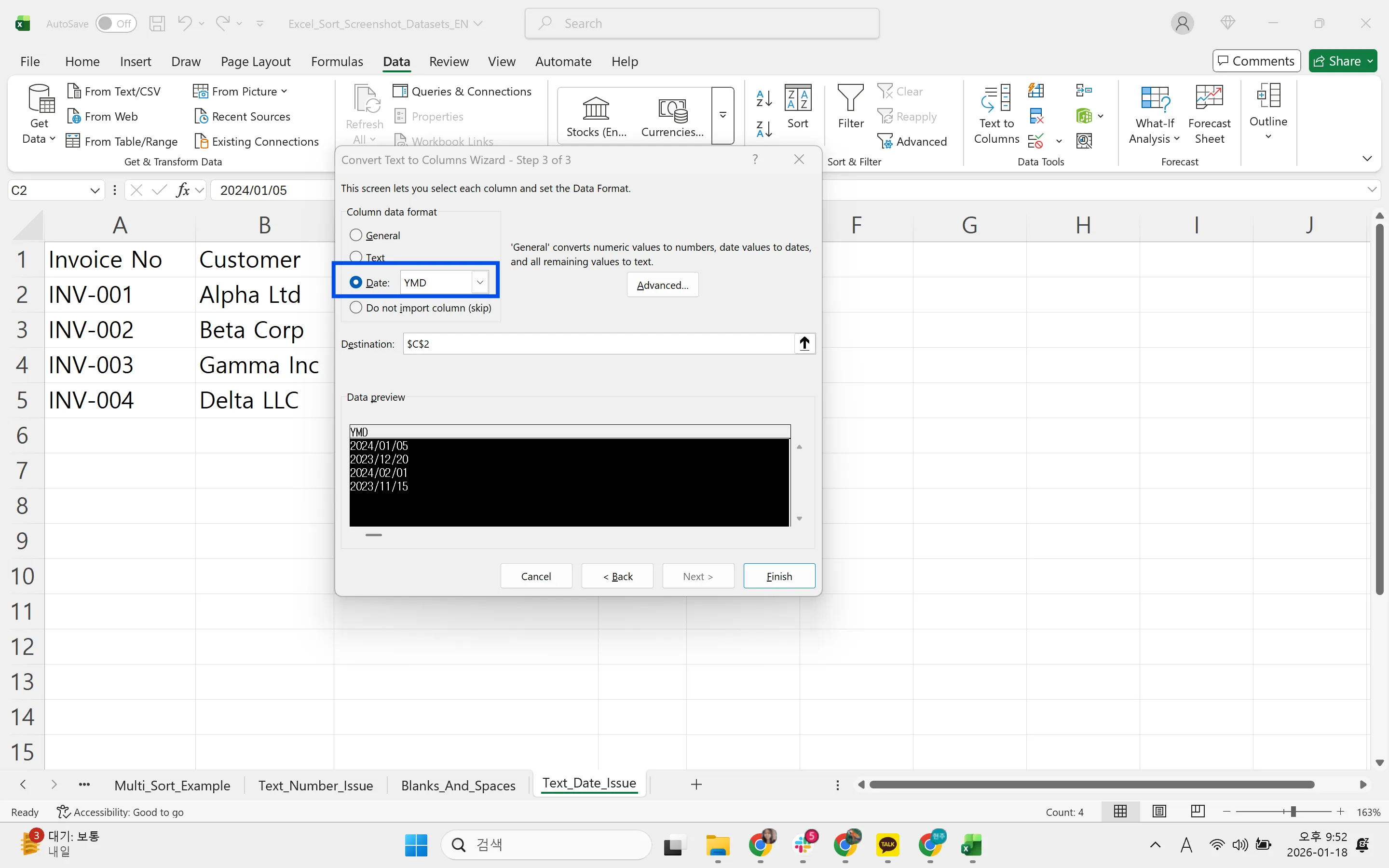
If changing the format to Date doesn't help, the values are text. Use Data > Text to Columns with a date format, or standardize separators with Ctrl+H and rebuild the date with the DATE function.
Remove extra spaces
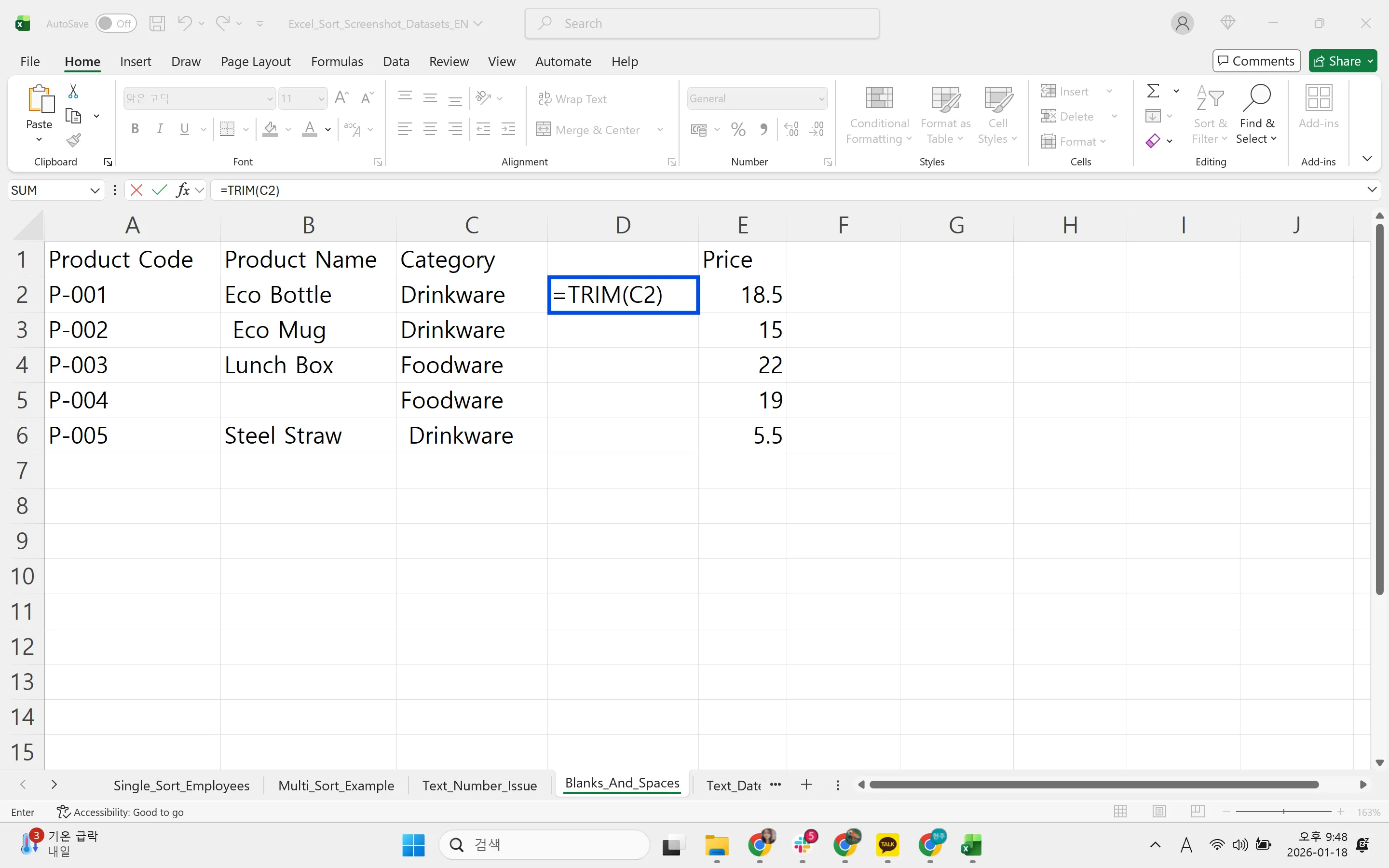
Enter =TRIM(A2) in a helper column, fill down, paste values over the original, and delete the helper. Or replace double spaces with single spaces using Ctrl+H.
Unmerge any merged cells before sorting, and fill the blanks they leave.
Excel Sorting FAQ
Q. Why do my numbers sort as 1, 10, 2, 20?
They're stored as text. Convert them to numbers and sort again.
Q. Only one column moved when I sorted. Can I fix it?
Press Ctrl+Z immediately. Then select the whole table, or click a single cell inside it, and sort again.
Q. What if the AI misreads a date?
It lists dates it couldn't read instead of guessing, and reports every conversion it made. You can undo the change, and the audit log shows what was edited and by whose request.
Q. Does the logistics partner's file get stored with the AI provider?
No. Company data is stored on AWS and isn't used for training. inline AI has an eZDR agreement with its model provider, which stores neither prompts nor files.
Sorting with inline AI
The Sort dialog is simple; the time goes into fixing text numbers, text dates, merged cells and stray spaces in files that come from outside. In the AI Browser, you keep the file open and ask the AI beside it for the order you need; it fixes what would break the sort, sorts the full table, and tells you what it changed. It works inside your company account and permissions, sends actions above the risk threshold to approval, and records every change in the audit log.
In the AI Browser, this takes one request
inline AI OS is a work browser where your team keeps company files open and hands the task to the AI beside them. Book a free consultation to see how it fits your operations.
Book a free consultation